


Most roofing software tells you what a job should cost. Workyard tells you what your crews actually cost, minute by minute, job by job. That’s a different problem, and it’s the one that quietly eats margin when three crews are spread across town and every time card says 7:00 AM. This Workyard review looks at the product strictly through a roofer’s eyes: what it fixes, what it doesn’t, and whether the price holds up.
Quick Answer
Workyard is worth it for roofing companies running multiple crews that need GPS-verified time cards and real labor costs by job and cost code. It exports to QuickBooks, ADP, Gusto and other payroll systems, and every plan comes with a 14-day free trial with no credit card. It is not roofing software (no estimates, measurements, CRM or material ordering), so pair it with a roofing CRM. RSG Score: 8.4, RSG Silver.
RSG Verdict
Workyard is the labor side of a roofing business done right: GPS-verified clock-ins, cost codes that post labor to the job as the work happens, and payroll exports that kill the Friday scramble. Buy it for crew time and labor costs. Do not expect it to estimate, measure or sell a single roof.
 8.4
8.4
What Is Workyard? Overview for Roofing Contractors
Workyard calls itself a construction operations platform for specialty contractors and self-performing general contractors. In plain English, it’s construction workforce management. Crews clock in on their phones, GPS confirms where they were, hours land on the right job and cost code, and the office exports clean time cards to payroll.
So what is Workyard used for? Three things: GPS time tracking and payroll prep, labor job costing, and crew scheduling with field forms. That’s the whole pitch.
Here’s what it isn’t. Workyard has a roofing page on its site, but it’s a general construction page. There are no measurements, estimates, insurance claim tools, CRM or material ordering. That’s why we scored it on our Specialized Tools track (see how we score software) instead of against full roofing platforms.
We evaluated it for the way roofing companies actually run: multiple crews, short jobs, foremen who run the day, and supply-house runs in between.
Workyard Time Tracking Review: GPS, Geofencing, Job Costing and AI Agents
Clock in/out and GPS-verified time
Every plan, including Starter, gets the time clock app, employee-led and supervisor-led time tracking, break and overtime rules (state, federal or your own), and a full audit trail of time card changes. The GPS goes past breadcrumbs. The Locations view shows each address visited, entry and exit times, time on site, and driving trips with mileage, without setting up geofences first.
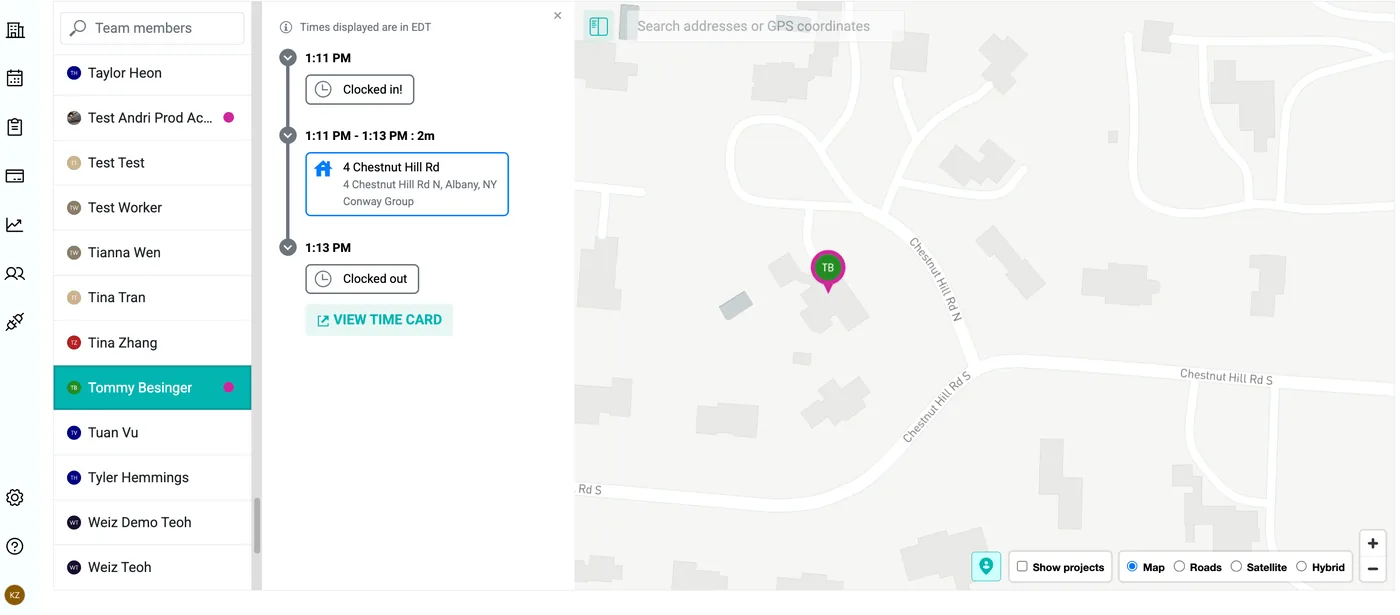
Supervisor-led tracking is the feature roofers should care about most. A foreman can clock in the whole crew with one button, manage breaks and fix a worker’s time card from his phone. On a crew where the foreman runs everything, that’s how you get adoption on day one.
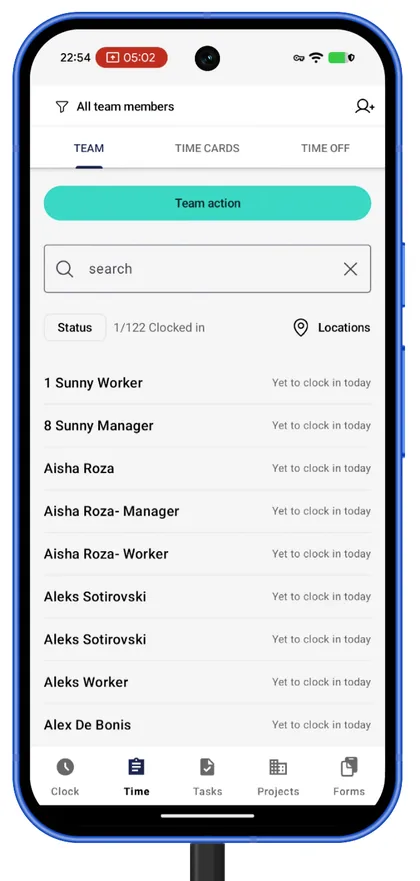
Mileage tracking and a live crew map are also on every plan. Workyard auto-detects driving, maps the route and reports mileage and travel time per worker.
Geofencing and Autopilot automatic clock-in
Geofencing controls start on Pro. You can restrict clock-ins to inside a geofence, push a reminder when a worker arrives on site, start tracking on arrival even if he forgets to clock in, set clock-in time windows, cap hours per time card, and verify clock-ins with facial photos. The kiosk app (a shared time clock with centralized login) is also a Pro feature.
Autopilot adds automatic clock-in when a worker enters a geofence, clock-out times trimmed to the last geofence visited, and automatic meal break rules with a reminder after 5 hours. Workyard says drive-through clock-ins get trimmed to the actual arrival time. That’s the “7:00 AM on every card” problem, solved.
Job costing reports and cost codes
Pro adds labor cost reporting. Workers pick a cost code with one tap and can switch codes during the day. Labor cost recalculates on every clock-out and posts to project and cost code reports.
The labor cost report shows hours, pay, workers’ comp and total cost per project, and it flags unallocated time in red. Each project gets a live dashboard with time, cost, mileage and travel time. If you want to see what those labor numbers do to your margin, run them through our true margin calculator.

AI agents, Time Assistant and Smart Forms
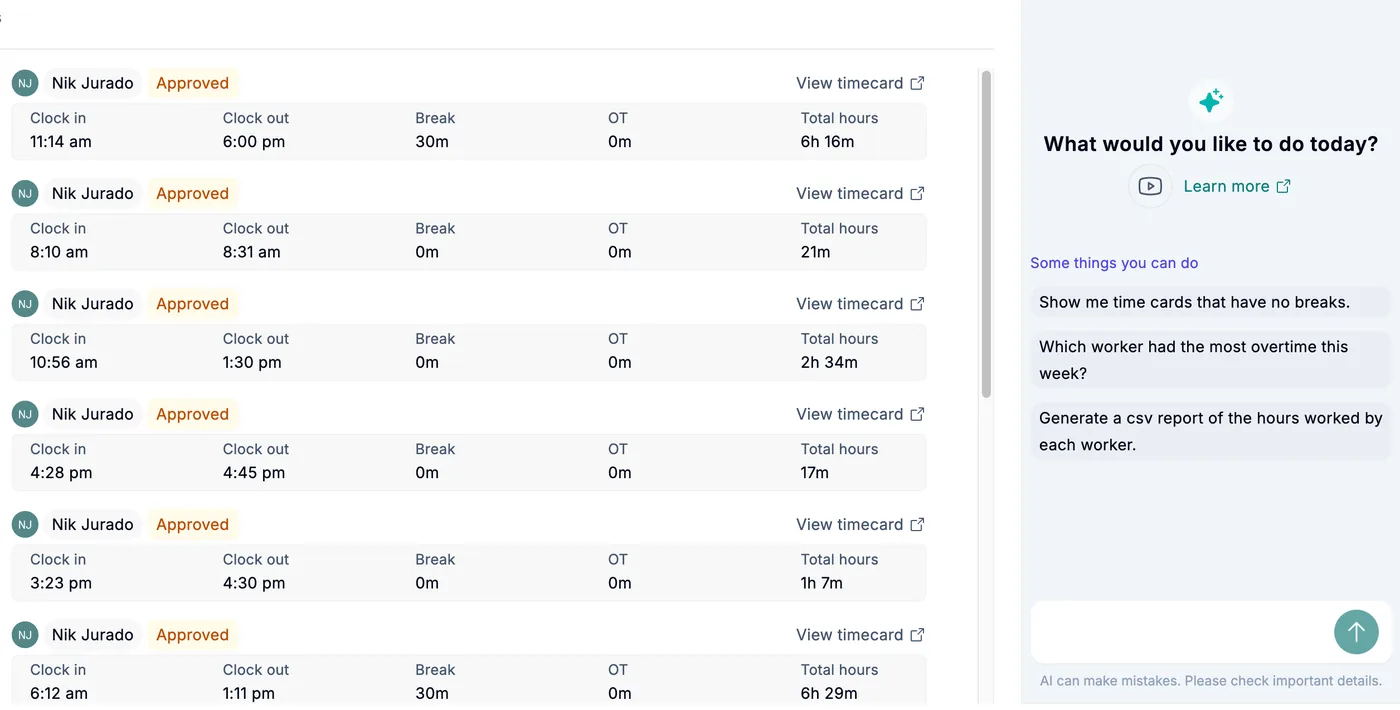
Workyard now pitches its automation as AI agents that check GPS time, fix errors and put labor on the right job before anyone in the office opens a spreadsheet. The most concrete piece is Time Assistant, labeled New on Workyard’s pricing page as of September 2026 and included on Autopilot.
It’s a chat inside Time Cards. A manager asks it to find missing breaks, bad punches or crews heading into overtime, and it reviews every card in the pay period. Each fix shows as a before-and-after, nothing saves without approval, and it only touches start times, end times and breaks, never cost codes or job costing.
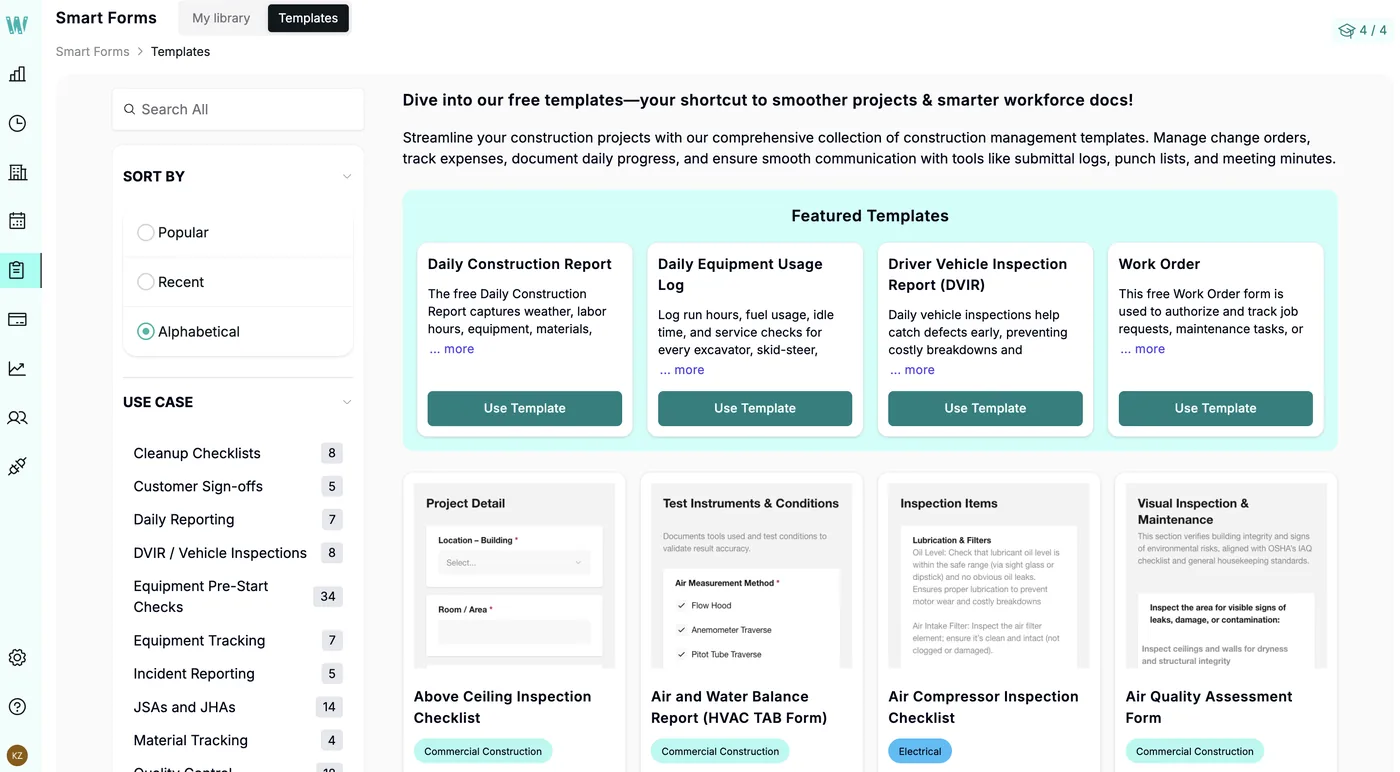
Smart Forms is a paid add-on: an AI converter that turns a paper or PDF form into a mobile form, 200 ready-made templates, and forms that pop up at clock-in or clock-out. Toolbox talks, incident reports and inspection checklists live here, which helps when you’re documenting crew training against OSHA fall protection requirements.
Workyard Pricing in 2026: Plans, Add-Ons, and Hidden Costs
Workyard pricing is only half-published. The page prints one number: plans start at $6 per user per month, billed annually, with monthly billing also available. No per-plan price appears for Starter, Pro or Autopilot, and Enterprise is contact-sales.
Starter
- GPS time clock app, employee and supervisor-led tracking
- Break and overtime rules, audit trail
- GPS, mileage tracking and live crew map
- Payroll exports and phone support
- Workyard Visa Debit Card for field expenses
Pro
- Everything in Starter
- Crew scheduling and tasks
- Geofence clock-in rules and kiosk app
- Job costing by project and cost code
- Accounting integrations
Autopilot
- Everything in Pro
- Automatic clock-in and auto-trimmed clock-outs
- Time Assistant and Project Time Tracking Agent
- Time card sign-offs and incident reporting
- ERP integrations and API access
Enterprise
- Everything in Autopilot
- Large rollout support
- Custom integrations
- Dedicated account manager
The plan-fit problem for roofers: Starter has no cost codes or labor cost reporting. If job costing is why you’re shopping, you need Pro at minimum. If you want crews clocked in automatically when they pull onto the roof, that’s Autopilot.
One reviewer called out exactly this: automatically assigning a time card to a geofence clock-in required paying for a higher tier bundled with services they didn’t need. On today’s page, automatic time allocation sits on Autopilot, two tiers above Starter.
Pricing is per user. Another user asked for crew leaders to be non-paying users while still tracking crew hours, instead of paying per employee. Workyard doesn’t work that way: at the $6 starting rate, a 15-worker crew is at least $90 a month billed annually before any plan upgrade, and Pro and Autopilot rates aren’t published.
Two more unpublished costs: the Smart Forms add-on has no listed price, and the pricing page lists no fees or terms for the Workyard Visa Debit Card. The good news is the free trial: 14 days, no credit card, cancel anytime.
Our Pricing Value score of 8.0 reflects that: fair value once you know the number, but you have to ask for it.
Workyard for Roofers: Fit for Multi-Crew Jobsites
Residential roofing burns through job sites fast. Pro includes unlimited projects and geofences with archiving, so creating a geofence for every address doesn’t cost extra. Project Groups sort jobs by crew, region or foreman, which is how most roofing owners already think about their week.
Cost codes for roofing phases. Workyard lets you bundle cost codes into groups. Set up codes for tear-off, dry-in, install and punch list, and your crew switches codes with one tap as the day moves. Now you know whether tear-off is killing your bids or the install crew is dragging.
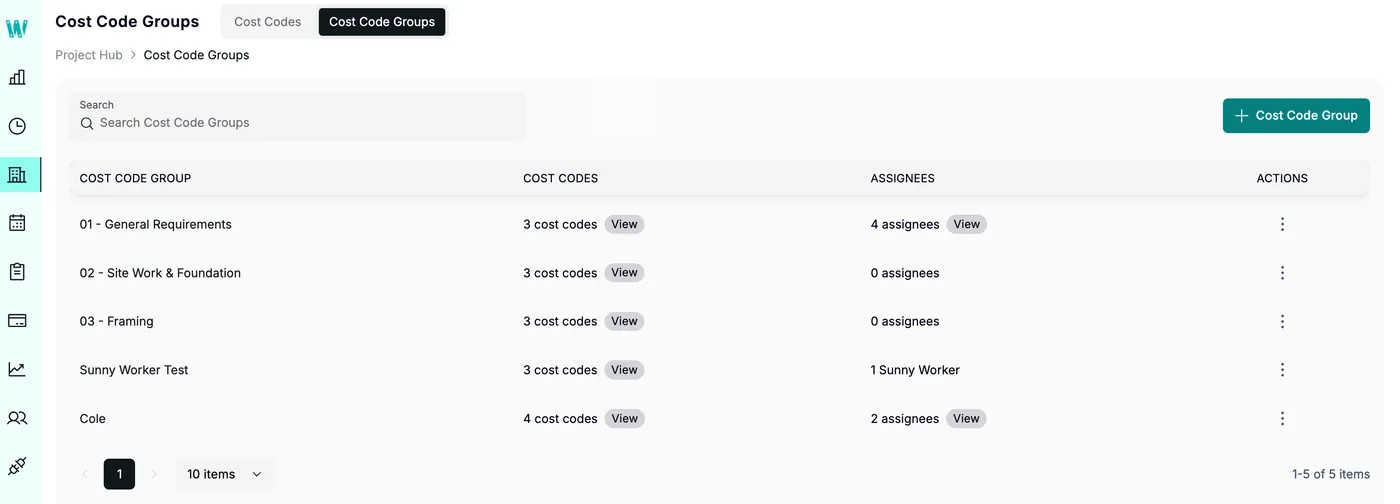
Workers’ comp in the labor report. The labor cost report splits pay and workers’ comp by customer, project, employee and cost code. For roofing, comp is a line every owner watches, and seeing it per job beats guessing at year-end.
Driving between jobs. On Pro, workers assign their own time to a project and cost code when they clock in. Autopilot’s automatic project time rules decide where driving and offsite time lands: on the next project visited, split evenly, or left unallocated. Decide up front how you want dump and supply-house runs handled, because with the next-project rule they land on whatever address comes next.
Supply-house purchases. The Workyard Visa Debit Card lets you control who can buy, where and how much. Workers get prompted for a receipt on every purchase, and on Pro each purchase can be forced onto a project and cost code.
The gaps are real. Workyard does no estimating, roof measurement, insurance claims, CRM or material ordering. It lists no integration with AccuLynx, JobNimbus, Roofr or Leap. The Smart Forms templates Workyard showed us are general construction (daily construction report, vehicle inspection, equipment usage log), not roofing-specific.
That’s why Roofing-Specific scored 7.8. If you need the sales and production side, look at a platform like AccuLynx and run Workyard beside it.
Workyard Pros and Cons
Our Ease of Use score (8.7) comes from how little the field has to do: one tap to clock in, one tap to pick a code, or nothing at all on Autopilot. The learning curve sits in the office, setting up geofences, cost codes and rules. Support scored 9.0 because every plan includes phone support from real humans and integration technical support.
Pros
- GPS-verified time with address-level site visits and driving detection on every plan, including Starter
- Supervisor-led crew clock-in on every plan, so foremen can run the crew’s time
- Job costing by project and cost code, with workers’ comp in the labor cost report (Pro)
- Time Assistant checks a whole pay period and changes nothing without admin approval (Autopilot)
- Payroll export integrations to QuickBooks Online, QuickBooks Desktop, ADP and Gusto from Starter up
- 14-day free trial with no credit card
Cons
- Only a $6 starting price is published; Pro and Autopilot per-user prices are not
- Automatic clock-in and automatic time allocation are locked to Autopilot
- Smart Forms is a paid add-on with no published price
- Not roofing software: no estimates, measurements, CRM or material ordering, and no roofing CRM integrations
- Users report battery drain and sync lag in weak-signal areas
- Kiosk app and geofence clock-in restrictions are not on Starter
Common Workyard Complaints: What Users Report
Battery and background location. Users say keeping the app running in the background is a hassle, and one noted extra battery drain with location on. Workyard’s help center says auto clock-in needs all location permissions turned on for the app.
Weak-signal lag. Reviewers say the app can take a few seconds to sync with weak signal, though it catches up. Another reported a noticeable delay on poor service. Rural reroofs, take note.
Auto clock-in quirks. In a hands-on test published by competitor Timeero, auto clock-in fired while the tester was driving near a geofenced site. Workyard’s help center says an auto clock-in time card from a stay under 5 minutes may be deleted on its own. Workers still clock out themselves: the auto-trim rule only resets the finish time to when they left the geofence.
Notifications. Workyard’s Pro plan lists mobile alerts for new tasks, but reviewers want alerts when someone adds to a checklist, and one said phone notifications don’t explain what they’re about.
Seasonal rehires. Users call deactivating and reactivating employees a pain, including getting a rehire’s phone status working again. If you lay off in winter and bring guys back in spring, test this during the trial.
Smaller gripes. Users want to click visited sites to reallocate time, see a month of jobs without clicking each day, and reach the live map without going through Time Cards. Workers can’t see total mileage after submitting a timesheet; a manager pulls it from reporting. One user reported the site freezing during job number entry.
Privacy pushback. Some field workers say location tracking feels like a privacy compromise. Explain the why before rollout; our guide on getting your crew to actually use the software covers that conversation.
Workyard Integrations: QuickBooks, ADP, Gusto and More
Workyard lists 15+ native integrations plus a REST API. What you can connect depends on the plan:
- Payroll export (every plan): one-click time export to payroll; Workyard names QuickBooks Online, QuickBooks Desktop, ADP and Gusto
- Accounting (Pro and up): import and sync jobs and cost codes, export project time and field expenses
- ERP and API (Autopilot and up): ERP sync with systems like Sage, NetSuite, ComputerEase and Foundation, plus an API with 60+ endpoints and no usage fees
The full native list: Acumatica, ADP Run, ADP Workforce Now, ComputerEase, Foundation Software, Gusto, Microsoft Excel, Oracle NetSuite, Paychex, Paycor, Paylocity, QuickBooks Desktop, QuickBooks Online, Rippling, Sage 100 Contractor, Sage 300 CRE, Sage 50, Sage Intacct, Spectrum ERP and a custom file export. Workyard’s in-app screen also shows Procore, and marks ADP Workforce Now as a certified payroll solution for prevailing wage. That matters if you bid public commercial roofs.
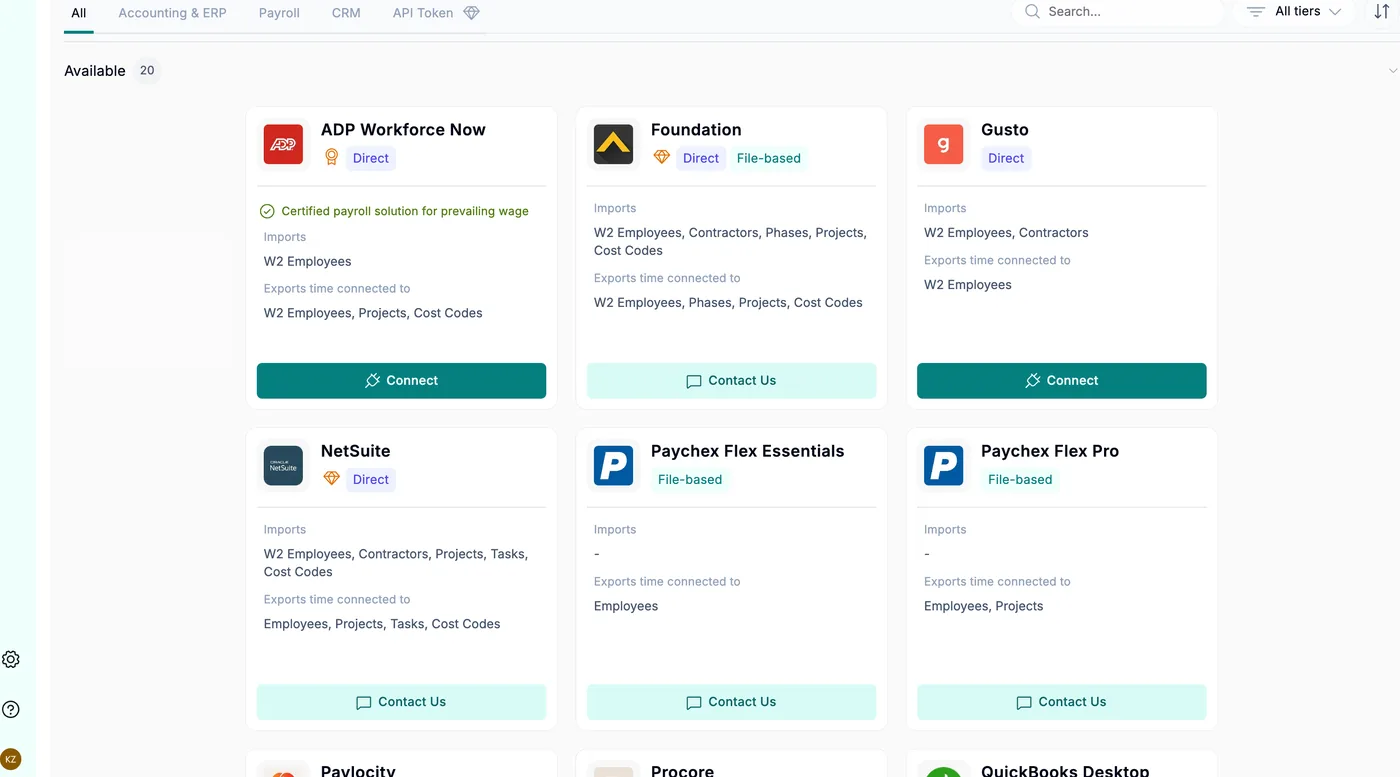
Practical tip: build your roofing cost codes in your accounting system first, then import them on Pro. Codes stay identical on both sides, so job cost reports reconcile without cleanup.
One gap from users: a reviewer couldn’t export subcontractor hours to Gusto and had to enter them by hand. And again, no roofing CRM appears on its integrations list, so don’t expect estimates and job records to flow in from your CRM automatically.
Workyard Alternatives: Workyard vs Timeero, Connecteam and ClockShark
The Workyard alternatives roofers compare most are other GPS time clocks. Here’s what we can document on pricing and scores.
| Feature | Workyard | ClockShark | Timeero | Connecteam |
|---|---|---|---|---|
| Published pricing | Starting price only | Full plan prices ✓ | Full plan prices ✓ | Full plan prices ✓ |
| Pricing model | Per user, from $6/user/mo billed annually | $42/mo base + $9.50/user (Standard); $63/mo base + $11.50/user (Pro) | Per user: Basic $5 to $6, Pro $7.50 to $9, Premium $10 to $12 depending on billing term | Operations Hub from $29/mo billed yearly ($35 monthly) for the first 30 users, then $0.80 to $1 per extra user (Basic) |
| Base fee | None published | Yes | None | Yes, covers the first 30 users |
| Contract | Annual or monthly billing | Three-year term on all plans | Annual or monthly billing | Yearly or monthly billing |
| Free plan | No | No | No | Up to 10 users ✓ |
| Free trial | 14 days, no credit card | 14 days | 14 days, no credit card | 14 days, no credit card |
| RSG Score | 8.4 RSG Silver ✓ | 8.0 RSG Silver | Not scored | Not scored |
Workyard vs Timeero: Timeero publishes per-user prices for Basic, Pro and Premium with no base fee (Enterprise is quote-based), but its Basic plan caps at 10 users. Timeero also offers a 14-day free trial with no credit card required. Workyard doesn’t publish its upper-tier prices, but it gives you cost code reporting with workers’ comp broken out and ERP integrations. For a roofer who cares about job costing, Workyard is our pick.
ClockShark is the closest roofing-crew comparison we’ve scored, at 8.0 versus Workyard’s 8.4. Note that ClockShark’s pricing page states a three-year contract term applies to all its plans, while Workyard offers monthly billing. Our ClockShark review for roofing crews covers where it fits.
Connecteam is the budget option: a free plan for up to 10 users, and paid Operations Hub plans that charge a flat price for the first 30 users. For the full field, see our best roofing time tracking software roundup.
Company Background, Funding, and Reliability
Workyard is privately held and venture-backed. Tracxn puts its total funding at $10.7 million across three rounds, the largest a Series A in January 2020, and Blackbird Ventures lists Workyard in its portfolio. Treat the funding figures as third-party estimates, not vendor-confirmed.
If you ever leave, your records aren’t trapped: Smart Forms data exports to CSV and Excel, and labor reports export to Excel.
What Contractors Are Asking
“Do all my guys need the app, or can my foreman clock them in?”
Your foreman can clock in the entire crew with one button, manage breaks and adjust time cards from his phone. Supervisor-led time tracking is on every plan, including Starter. You still pay per user, though.
“Can I split one day between tear-off and install?”
Yes, on Pro and up. Workers switch cost codes with one tap during the day, and labor cost updates on every clock-out. Set up tear-off, dry-in, install and punch list codes before rollout.
“Does it sync with AccuLynx or JobNimbus?”
No. Workyard doesn’t list AccuLynx, JobNimbus, Roofr or Leap among its integrations. Its connections are payroll, accounting and ERP systems, plus an API on Autopilot if you want to build your own link.
“What happens on a rural job with one bar of signal?”
Users report the app can take a few seconds to sync in weak signal, then catches up. Another reviewer described a noticeable delay on poor service. Test it on your worst-coverage job during the trial.
Frequently Asked Questions
Is Workyard worth it?
For roofing companies with multiple crews that need GPS-verified time cards and labor costs by job, yes. Our Workyard review gives it an RSG Score of 8.4 (RSG Silver). It’s not worth it as a roofing CRM replacement, since it has no estimating, measurement or sales tools.
How much does Workyard cost?
Workyard’s pricing page says plans start at $6 per user per month billed annually, with monthly billing available. It doesn’t publish per-plan prices for Starter, Pro or Autopilot, and Enterprise is contact-sales. Smart Forms is a separate add-on with no published price.
What is Workyard used for?
Workyard is used for GPS time tracking, payroll prep, job costing by project and cost code, crew scheduling and digital field forms. Roofing companies use it to stop padded time cards and see true labor cost per job.
Does Workyard have a free trial?
Yes. Workyard offers a 14-day free trial with no credit card required, and you can cancel anytime. Use it to test geofences and cost codes on real roofing jobs.
What integrations does Workyard support?
Every plan exports time to payroll; Workyard names QuickBooks Online, QuickBooks Desktop, ADP and Gusto, and its native list also includes Paychex, Paycor, Paylocity and Rippling. Pro adds accounting sync for jobs and cost codes, and Autopilot adds ERP integrations (Workyard names Sage, NetSuite, ComputerEase and Foundation) plus API access.
Is there a Workyard mobile app?
Yes. The Workyard app handles clock in/out with GPS status, tasks, schedules, projects, time cards, time off and Smart Forms. Office staff use the Login button on workyard.com for the web side.
How does Workyard’s GPS and geofencing work?
Every plan records addresses visited, time on site and driving trips without geofences. Pro adds geofence clock-in restrictions and arrival reminders, and Autopilot clocks workers in automatically when they enter a geofence, which needs all location permissions turned on for the app.
What are Workyard alternatives?
Common alternatives are ClockShark (RSG Score 8.0, RSG Silver), Timeero and Connecteam. Timeero publishes per-user prices for its Basic, Pro and Premium plans with no base fee, and Connecteam has a free plan for up to 10 users.
Final Verdict: Is Workyard Worth It for Roofing Contractors in 2026?
Workyard earns its RSG Silver on labor. GPS-verified clock-ins, cost codes that post labor to the job in real time, workers’ comp in the job cost report and payroll exports on every plan add up to a tool that plugs the labor leak in a crew-based roofing company: paying for hours nobody can verify. The weak spots are real: unpublished upper-tier pricing, Autopilot gating, battery drain and zero roofing-specific tools.
If you’re a roofing company running two or more crews and job costing is the goal, get Workyard on Pro or Autopilot, and get the quote in writing. If you just need clean payroll hours, Starter covers it. If you’re a small crew on a tight budget, look at Timeero’s Basic plan, which is priced per user with no base fee and allows up to 10 users. If you need estimates, measurements or a sales pipeline, Workyard isn’t your tool; pair it with a CRM from our independent roofing software reviews.
Start the 14-day trial on your busiest week, not your slowest. Spot something that’s changed? Tell us and we’ll update this review.
RSG Verdict
GPS-verified time tracking and job costing built for the trades. Workyard is our pick for roofing companies that want accurate crew time and real labor costs per job. Run it alongside a roofing CRM, and budget for Pro or Autopilot if job costing is why you’re buying.
